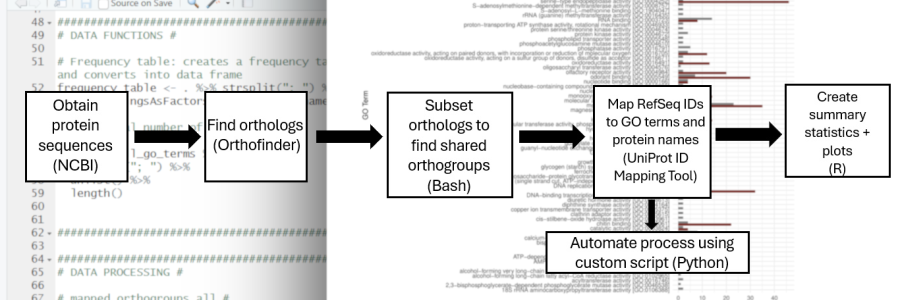
There is a lot of raw genetic data out there. The cost of sequencing genomes has drastically gone down thanks to the advent of next-generation sequencing technologies. The result is a plethora of genomes available on the National Center for Biotechnology Information - boasting 3.12 million total assembled genomes at the time of writing, with 2.52 million of them being annotated. That isn’t even counting non-assembled genomes, which poses a problem in itself!
Today’s current problem is making sense of all of that data. All of life is coded in sequences of four letters – A, C, G, and T – and from just those four letters, we can learn almost anything about a species. Over time, the biological problem of determining species function became a computational one.
But where do we even begin? How do we use computational data to get meaningful biological insights?
My final group project for my undergraduate Genomics class decided to tackle comparative genomics: comparing mosquito genomes. We wanted to see if there were significant genetic differences that determined their abilities as human disease carriers.

OrthoFinder
For my part of the project, I decided to do gene set comparison between three species using a command line tool written in Python called Orthofinder. OrthoFinder determines orthologous groups (orthogroups), which are homologous (similar) genes among species that separated from a speciation event. (Contrast these with paralogs, which are homologous genes from a gene duplication event.) Essentially, for my purposes, comparing homologous genes was the key to highlighting the genetic differences between the mosquitos.
OrthoFinder analyzes given FASTA files of genomes and produces numerous output files describing all analyzed orthogroups, phyologenetic groupings, statistics, gene duplication events, and gene and species trees. There is a lot of data, but how do we make sense of it?

Mapping Genes: The Biology Side of Bioinformatics
This is where the Central Dogma comes in to play. For those of you unfamiliar, it goes like this:
DNA → RNA → Protein
This means that DNA nucleotides (A, C, G, and T) map to RNA (similar to DNA, except replace the U with a T), and three sets of RNA code to one amino acid, which create a protein.
Proteins are the key here: they are the foundation of all cell functions, and they determine function in a species. It’s why something like AlphaFold was so revolutionary – being able to predict the way protein was structured, which was a notoriously difficult task, unlocked the key to what it actually did.
I needed a data pipeline to map the genes to proteins. There are numerous (free!) databases for any budding bioinformatician to do their own research. The beauty of biologists’ meticulous need to gather data is that they tend to make it available for others to use.
In this case, I used the UniProt Database. UniProt provides several APIs to automate this process programmatically, which is highly useful when you’re querying tens of thousands of different genes. OrthoFinder helpfully provided protein IDs, which map onto a protein in the UniProt database.
With the help of a hastily-drawn note describing my data pipeline, my group member was able to write up a Python script to called the ID mapping API.

The pipeline went something like this:
- From
Orthogroups.tsv, an output file from OrthoFinder, remove any orthogroups that aren’t shared between at least two species. - Each orthogroup was a single job that queried the database. For each job, pull out the GO IDs and GO terms.
- Group the orthogroups shared for all species or between two species (for a total of four different files)
The result was a table of gene functions for each identified orthogroup:

GO Terms
What are GO terms? GO stands for Gene Ontology , the most comprehensive, unifying source of gene function. This is the best way to connect genes and proteins to actual function. Now we’re getting somewhere!
Each orthogroup was identified under
- All three mosquito species
- Aedes aegypti and Anopheles moucheti
- Anopheles moucheti and Culex pipiens
- Aedes aegypti and Culex pipiens
From there, we could determine which groups shared which functions.
Using R to Process & Visualize Data: The Computational Side of Bioinformatics
The best way to understand these data was to visualize it. R is a fantastic language to use for data visualization, although this could have easily been done using Python. I like to call R the “spreadsheet language” because it’s highly amenable to working with spreadsheet data (known as “vectors” in R).
I used a collection of packages for R called Tidyverse, which include data science packages like dplyr and ggplot to analyze the data output from our data pipeline.
(This section will get pretty code-heavy!)
Frequency Table Data Pipeline
To create a frequency table of GO terms, I created the following pipeline:
frequency_table <- . %>% strsplit("; ") %>% unlist() %>% table %>%
sort(decreasing=T) %>% as.data.frame(stringsAsFactors = F) %>%
set_names(c("GO.term", "Frequency"))
Breaking it down:
frequency_tableis the name of the function<-is the assignment operator in R-
%>%is a pipeline character from the magrittr package. It basically means use the data on the left as input for the next function, and forms the basis of data piping in Tidyverse - The
strsplit()function splits a string; in this case, it was used to separate between the GO terms, which was separated with; unlist() %>% tablecreates a table of all of the GO termssort(decreasing=T)sorts the table in descending orderas.dataframe(stringsAsFactors = F) %>% set_names(c("Go.term", "Frequency"))creates the frequency table for each GO term
This function was called for each of the previously-described four groups of orthogroups.
Often in bioinformatics and data science, you will be cleaning up and analyzing data. The data pipeline is an excellent way of doing this without altering the original data and visualizing exactly how the data is transformed at each step. The script can be run one step at a time to trace how the data is being transformed and catch any errors.
Mapping GO Terms by Orthogroup
This code snippet looks just as complicated, if not more so, but if we trace how the data is transformed, it becomes easier to understand.
mapped_orthogroups_m_terms <- mapped_orthogroups %>%
    select(Orthogroup, go_m, -job_id, -go_b, -go_id) %>%
    separate_rows(go_m, sep = "', |\\\", ") %>%
    mutate_at("go_m", str_replace, "\\[\\]", "none") %>%
    mutate_at("go_m", str_remove, "^\\['|^'|^\\\"") %>%
    mutate_at("go_m", str_remove, "'\\]$") %>%
    group_by(go_m) %>%
    mutate(orthogroup_list = map_chr(Orthogroup,
    ~toString(union(Orthogroup, .x)))) %>%
    select(go_m, orthogroup_list, -Orthogroup) %>%
    unique() %>%
    mutate(length = str_count(orthogroup_list, ",")+1) %>%
arrange(desc(length))mapped_orthogroupsis the raw data that was originally loaded inselect()selects the columns to be analyzedmutate_at()is a special function that allows functions to be applied for certain columns. Thestr_replaceandstr_removefunctions remove any blank IDs and extraneous charactersgroup_by(go_m) %> mutate(orthogroup_list = map_chr(Orthogroup, ~toString(union(Orthogroup, .x))))groups the molecular GO terms into frequencies-
group_by()allows the data to be transformed by group -
mutate()creates a new column -
map_chr()applies a function to each element of a vector or list – in this function,
-
unique()removes any duplicate rowsmutate(length = str_count(orthogroup_list, ",")+1)created the frequency of each GO termarrange(desc(length))orders it by descending order
Creating Graphs with ggplot2
Lastly, to neatly visualize the data, we can create bar graphs. ggplot2 provides an excellent way to create beautiful graphs.
GO Term Frequency Bar Graph
mapped_orthogroups_m_frequency_bargraph <- head(mapped_orthogroups_m_terms, 30) %>%
    ggplot(aes(x=fct_reorder(go_m, length), y=length, fill=go_m)) +
    geom_bar(stat="identity", position = position_dodge(), show.legend=F) +
    labs(x = "GO Term", y="Number of Orthogroups") +
    scale_fill_viridis(discrete=T) +
    theme_minimal() +
coord_flip()- The
head()function only took the top 30 molecular GO terms. - The
ggplotfunction takes theaesfunction, which allows you to describe which data corresponds to- The x-axis (
x): the number of orthogroups-
fct_reorder()obtained getting the frequency of GO terms
-
- The y-axis (
y): Number of orthogroups - The colour (
fill): Each GO term had a different colour
- The x-axis (
- Each function related to
ggplotis separated with a plus sign+to describe the data and look of the actual plot geom_bar()draws a bar graph, and takes arguments for its looklabs()describes the label for the x- and y- axisscale_fill_viridis(discrete=T)used the viridis colour scheme packagetheme_minimal()applies the minimalggplotthemecoord_flip()swapped the x- and y-axis for easier reading
The result was this graph:

GO Terms by Species Bar Graph
To make a GO terms by species bar graph, I first made a frequency table:
species_molecular_frequency <- merge(anopheles_aedes_go_molecular_frequency,
    aedes_culex_go_molecular_frequency, by="GO.term", suffix =c(".Anopheles.Aedes", ".Aedes.Culex"), all.x=T) %>%
    replace(is.na(.), 0) %>%
gather(key="Species",value="Frequency", 2:3)- These were grouped by species: Aedes and Culex, and Anopheles & Aedes. Previous data analysis found no (annotated) ortholog groups between Culex and Anopheles. These data were merged with the
merge()function by GO term. - Then the
replace()function removed any missing data - Finally,
gather()was used to create the frequency table of GO terms per species
Similar to the graph above, I used geom_bar() to create a bar graph with ggplot:
species_molecular_frequency_bargraph <- species_molecular_frequency %>%
    ggplot(aes(x=GO.term, y=Frequency, fill=Species)) +
    geom_bar(stat="identity", position = position_dodge()) +
    theme_minimal() +
    coord_flip() +
    labs(x = "GO Term", y = "Frequency") +
    scale_fill_manual(labels=c("Aedes & Culex", "Anopheles & Aedes"),
    values=c('#742017', '#7F7F7F'))
The result was this graph:

Back to Biology - Interpreting the Data
Now that there is an easier way of visualizing data, the data itself needs to be interpreted to have biological meaning.
An important thing to note is the lack of database information does not constitute a lack of relationship. There are many, many protein sequences that have yet to be analyzed and annotated in the UniProt database. While we may know what we know, we don’t know what we don’t know, and a lack of data should be treated with caution when making assumptions.
In this dataset, there were 13,000 orthogroups, and about 80% of them were mapped in UniProt. From those proteins, 23% were considered “uncharacterized”. There is a lot of room for research into particular proteins.
Most of the shared GO terms were related to ATP binding, DNA binding, and RNA binding, which is going to be common among most species. There were also shared iron transport orthologs and olfactory orthologs, which relate to mosquito disease transport. For my complete analysis, see my report on my portfolio [PDF link].
Although I’ve shown a singular data pipeline, this is by no means the only pipeline that can be used. I was interested in shared GO terms; however, one could upscale this to more than three mosquito genomes, and look at other data such as phylogeny construction and gene duplications. There are numerous ways of comparing genomes aside from gene sets - the entire genome structure itself can be compared, too. This was only one method of many in a larger project to compare mosquito genomes. Being able to wrangle and make sense of the large amounts of data is a Herculean task, but we can take advantage of databases and their APIs to make it easier.
Conclusions & Further Steps
The world of comparative genomics can have as wide or as narrow of a field as you wish. My only limitation was the time to dedicate to a school project and the storage of the Unix server I was given access to, but these data pipelines can get very complicated, very quickly.
The Python and R scripts were written specifically for the data we already know and for the specific use case of OrthoFinder, but the broader concepts of transforming data and mapping using keys can be applied for multiple use cases. Bridging the gap between analysis and API into databases is a powerful way to analyze data.
A more steamlined approach might be to create another, more general Python script that can be run in the command-line after Orthofinder to map the data given the number of columns column names, creating another standard output. Python also has its own share of data libraries and can be used to visualize data. There are other data OrthoFinder files produces that could be visualized with a general R or Python script.
A data pipeline is a bit like the central dogma of biology. Like the flow of gene information goes from DNA, to RNA, and lastly to protein, the raw DNA data too can be analyzed and transformed into graphs and meaningful analysis. And like the central dogma, the data pipeline can take a bunch of code and create something amazing.